

Blog about the SWMinis and MyMinis iPhone apps by Cherry Hill Technology, LLC. SWMinis is for Lego Star Wars Minifig Collectors to carry their collection on an iPhone and see and rate all 400+ figures. MyMinis is for collectors of the Collectable Minifig Series. SWMinis and MyMinis are unofficial apps and are not created by Lego. (See the legal note in the iTunes listings)
Wednesday, September 30, 2015
MyMinis updated with both Series 14 (Monsters) and previous series
MyMinis (iPhone / iPad app) is updated with Series 14 (Monster theme) and the previous series. The app shows quality photos that depict an easy to compare view of images of the collectable minifig series. These photos are only taken for use only in this app. The photos are of retina quality and look especially amazing on the iPad (a higher res version is used for iPad). You can clearly see the tiny details and mark the figures in your collection. The touch guide is also included and shows the parts that help you identify the hidden figure in the unmarked bags.
Tuesday, March 10, 2015
SWMinis and MyMinis Updates are Both Submitted and Pending Approval
A very large content update to SWMinis was submitted and is pending approval. If approved it should be live be live around March 14/15th according to current review queue times. I am really sorry it took so long this time. It includes over 80 figures from 32 sets: all the 2015 sets and the remainder of the 2014 sets, including the Sandcrawler UCS and Slave I UCS.


An update to MyMinis for Series 13 was also just submitted. If approved it should be live around Wednesday March 18. It includes the new 16 minfigures and the Touch Guide for Series 13.
Tuesday, May 6, 2014
MyMinis updated with the new series from May 2014!
The new May 2014 update is here and has the new 16 minfigures. (This is the 13th series that has been released so far.) Get the app and you will be pleasantly surprised to these minifigs - you will instantly recognize them!
The previous update in January (the 12th series) was for figures from The LEGO® Movie, just in time for its release in theaters! These figures are awesome, and I loved the movie. Here are some screenshots from the app. Of course the touch guide will help you find them too by touch, the best way to find them all!

The previous update in January (the 12th series) was for figures from The LEGO® Movie, just in time for its release in theaters! These figures are awesome, and I loved the movie. Here are some screenshots from the app. Of course the touch guide will help you find them too by touch, the best way to find them all!
Tuesday, April 15, 2014
SWMinis Updated with New 2014 Minfigs
Last week SWMinis was updated with lots of new figures from the 2014 Star Wars sets. Enjoy! TC-4 made it in too. Also added was the rare Padawan and Holocron Droid from the Yodocron set.

Wednesday, October 23, 2013
SWMinis Update Live for September 2013 Wave and iOS7
The update for SWMinis version 1.1.3 is finally done and submitted for iOS7 and the September Wave.

This update has four major improvements.


This update has four major improvements.
It includes 68 new figures from the recent September 1, 2013 (United States date) release of Star Wars sets. The is the largest content update ever in terms of new figures in one wave. These new figures are stunning and the quality and detail of printing is amazing. Our photos really pop on an iPad where you can see all the figure details.
Second, the code has been moved to iOS7. IOS7 is such a large change from iOS6 that it made sense to just move to 7. The app is more stable as a result, and unlike iOS6, almost all devices can upgrade. The user interface has been reworked so it is cleaner, lighter, and more elegant. (We pulled the app from sale back in September shortly after iOS7 came out, once we noticed it didn't work well with iOS7, as we didn't want folks getting a bad first impression.)
Second, the code has been moved to iOS7. IOS7 is such a large change from iOS6 that it made sense to just move to 7. The app is more stable as a result, and unlike iOS6, almost all devices can upgrade. The user interface has been reworked so it is cleaner, lighter, and more elegant. (We pulled the app from sale back in September shortly after iOS7 came out, once we noticed it didn't work well with iOS7, as we didn't want folks getting a bad first impression.)
Third, the old character naming and descriptions needed a drastic overhaul, as well as the organization and set placement of the more unusual items like book and polybag figures. The character descriptions as well as many names have redone so they are consistent, easily understood even by someone who is not into the SW universe or Lego, fall into line alphabetically, and allow for easy comparison between many versions of the same figure name. The old descriptions were too short and not descriptive enough. The variations between many of the figures are very subtle and needed a clearer description. As you can tell, rewriting almost 600 descriptions took a while. Here is a sample for some droids for instance:

Finally we altered the external site information page to use a simple figure name search. In this update we have buttons that link to Brickset and Brick Owl. Brickset is a comprehensive site of all sets and figures, and Brick Owl is an easy to use online store where many individuals sell minifigs and Lego bricks. You can easily browse these sites based off the current figure name search results.
Sunday, September 22, 2013
MyMinis Series 11 - iOS7 Version
A second upload of the update for MyMinis was submitted today for review (currently a six day period). This is the same content as the earlier Series 11 update, but this one will let folks with iOS7 devices get that look and feel, while iOS6 folks will be still able to download the iOS6 version. The app store auto chooses the most up to date version that you can actually run on your device. That is a new feature of the app store. Neat!
Here are some screenshots of how the app looks now in iOS7. I 'get it' now in terms of what they were trying to do with iOS7: let the content stand out on its own front and center. The new translucent bars look nice in my opinion.


Here are some screenshots of how the app looks now in iOS7. I 'get it' now in terms of what they were trying to do with iOS7: let the content stand out on its own front and center. The new translucent bars look nice in my opinion.


Thursday, September 12, 2013
MyMinis Series 11 Update
The update for MyMinis for Series 11 went live today. This set of figures is amazing and one of the best in my opinion. My youngest kid's favorite is the Gingerbread man, so that had to be on the lead screenshot which is below. It was approved in one day which is a record!
I added extra color to the app and it is important to note that this update supports iOS6 and 'sort of' supports iOS7. Go ahead and upgrade to iOS7 if you can.


I added extra color to the app and it is important to note that this update supports iOS6 and 'sort of' supports iOS7. Go ahead and upgrade to iOS7 if you can.
Here are a few more screenshots.

The Touch Guide for the Series 11.

A little color was added all around.

I plan to release an iOS7 only update that uses the iOS7 new design look
and feel. However you will automatically get this version (the iOS6 one) if you have iOS6. Both this one and the upcoming one have identical content and both are for series 11.
There is a new app store capability I just discovered and that was not well known, that allows older versions to remain available for download. You don't pick a version, but you will automatically download the newest version your device supports. This makes sense if the versions have the same content, as they do in the case for series 11 for this app. I sort of lucked into this by making the iOS6 version first, then upgrading my computer to make an iOS7 only version. I think I can also make an iOS6 version for SWMinis and also an iOS7 version, but will need to test this.
There is a new app store capability I just discovered and that was not well known, that allows older versions to remain available for download. You don't pick a version, but you will automatically download the newest version your device supports. This makes sense if the versions have the same content, as they do in the case for series 11 for this app. I sort of lucked into this by making the iOS6 version first, then upgrading my computer to make an iOS7 only version. I think I can also make an iOS6 version for SWMinis and also an iOS7 version, but will need to test this.
Tuesday, September 10, 2013
SWMinis FAQ
The FAQ (frequently asked questions) is here to answer common questions about the SWMinis app. Any new questions should be sent to ideas@cherryhilltech.com.
What does the gold own button do?
This button lets you mark a figure as 'owned'. When a figure is owned, the button turns gold, as does the figure title text. In addition, the figure gets added to the ones on you own on the 'My Collection' screen. This information is not overwritten when the app is updated, so you won't loose it.
What are the blue and red flags for?
Short answer - they signify whatever you want! These are meant to serve a variety of uses for the collector. You don't have to mark a figure as owned to turn a red or blue flag on for that figure. You can turn on both flags or just one of them. In the lists, you will then see a flag next to the figure name, and on the my minifig tab you can toggle the upper right button to filter out figures with a red or blue flag. Here are some uses for the these flags:
How do I remove all stars so a figure has zero stars as the rating?
To remove all stars, swipe across the star ratings from right to left. Swipe all the past the leftmost star and it will be turned off too. The figure will now be unrated.
Where can I find minifigs to buy to complete my collection?
The best place to find figures is from Lego.com at their shop at home website there. All the most recent sets can be found there, and of being new they will be in perfect condition. For older figures look to focused fan storefront websites such as Brickowl. Be careful about buying on Ebay as many figures are custom and are not the real figure. Some advice: be sure to read the description carefully in all cases; do not expect the accessory to always be included with a used figure; and ask for a picture of the exact figure and head if none is listed. (Please note we are not affiliated with any site are are not in the business of selling figures. These are only suggestions. There might be other places to find older figures as well.)
Is the app safe for kids?
Yes it is. Apple has guidelines for the new kids section of the app store which does not allow external links, ads, or in-app purchases (unless you use a confusing 'parental gate'). A 'safe for kids' app means it does not link to websites or use social media, does not use in-app purchases, does not ask for or store personal information, and does not have live advertising. Also, the content must also be appropriate for an age group below 12 years old. With the update 1.1.4 in March 2014 this app is safe because it has been altered to fit these requirements, and thus does none of the above. Older versions linked to safe fan minifig websites, as well as our other apps in the app store, but we chose to remove those links in order to list the app in the kid safe section of iTunes.
Which accessory is shown?
If a better one appears for a style it replaces the old/empty accessory. For example, the new brightgreen lightsaber replaces green for Yoda. The only accessory in doubt is the choice to use a lightsaber vs lightning bolts for Palpatine.
What happens when the accessories are shown differently within the same set?
For set 9490, the Sandtroopers accessories are not consistently depicted between the instructions, box art scene, and box art minifig pic. Thus, a decision was made to defer to the accessory used in the box art minifig pic. Thus the white pauldron Sandtrooper has the longer blaster.
How are the figures's named?
Ideally we would want to use the official names on the boxes. However, this is not workable. Unfortunately the names given to figures over the years on the set boxes have not been done with the same level of detail. Often the name is omitted. In other cases the same figure is given different names from set to set. This has necessitated using a consistent scheme which is explained here, so that different styles of the same figure have the same name, and so the figures fall into order alphabetically by the most important part of their name. Basically, words have been reordered to preserve alphebtical order, for instance putting all clones starting with the word Clone. Ranks and Position such as Captain or Princess are appended to the end of the name in parentheses to ensure that the alphabetical order is preserved for the base name, which is more important. Thus Princess Leia is listed as Leia (Princess). The Lego name is used when mentioned, except when it would alter the alphabetical listing, differs from the box, or is not consistent (as is the case with Clone troopers). If a name appears on the box art minifig pic, then that name is used, and if needed, earlier figs of the same style are renamed. Some names for figures change or evolve. For example, set 9490 began the use of the term 'Sandtrooper'. 6 of the 14 Stormtroopers were thus renamed to Sandtrooper. If a more exact name is used for later versions of the figure, than earlier versions are altered so they all refer to the same figure, for example the Rebel Technician. Likewise if a more generic name is used later, then the earlier exact name is used, for example, R4-P17 rather then Astromech Droid.
How are the figures described?
Every figure has a lengthy unique description, even if there is only one style. Common English and easy to understand color names and descriptions are used and any mention of a containing set number, name, or the SW universe is avoided as that has nothing to do with the figures visual appearance. Colors and unique markings are described, and the parts or marks that distinguish one style from another are carefully analyzed and made as clear as possible. All descriptions have been revised and improved as newer styles and new figures are added.
What are alternate figs?
Many sets later released an alternate fig, and it is labeled as alternate only if it appeared in that set. The rare Leia with smooth hair is a good example of an alternate figure.
Creatures aren't minifigs?
Correct, they are not minifigures. However, folks wanted to see them and it is a fun thing to add, so here they are!
What is the small code in the lower left corner?
This is a unique code you can use to keep track of a particular figure. There is no order or logic to these codes, they are random and only found in this app, as we created them, but each figure has its own code. Beginning with the March 2014 update this code will appear in the app, so you could use it to write down a fig by this number to refer to it as well. We needed to come up with or own code since there is no official numbering scheme, or one that both includes all figures, includes the newest figures, and is freely available for all to use.
Why add the ability to find a fig via a set?
This is the most requested feature from several of you! Keep the emails coming for ideas and corrections!
What is the main set and how did you choose that?
The main set is the one that, in our opinion, best represents the figure, and is should be also the one that also has the accessory shown to the right of the figure. The main set is the one listed below a figure. If a figure only appears in one set then obviously it is the only one listed as the main set, with a title and a set number. If the figure appears in other sets only the set number is listed for the additional sets in a second row. You can look up more details for a set under the set tab and sort by number, year, or name, to find a particular set.
Will set pictures be added?
They will never be added as the app size would be unwieldy and the app design is on the minifig collector rather than the set collector. Older set pictures and info can be found at sites such as Brickset.com or Brickowl.com. Newer set pics of course are at the official Lego.com website.
Why not all sets?
A preference is given in the set listing to the traditional retail boxed Lego sets with models. Also the set listing is only for the purposes of creating a complete minifig collection, rather than a complete set collection. Please keep this in mind. This is a minifig collecting app first and foremost. Therefore, sets types without figures such as Technic and the Mini sets were left out. UCS sets are all included since some have figures, but are marked gray if they do not have figures. Duplicate sets such as combo sets, and ones with alternate box colors were left out since they offer nothing new in the case of minifigs. Lego gear that are considered 'non -sets', such as watches, magnets, books, and DVDs, are only included if they contribute a new minifig. The redundant ones are all omitted. Likewise, any exclusive or promotional non-set item such as toy fair exclusive is omitted if it also appeared in a more available mainstream set or polybag. In summary:
Why not quantities of figs for the same set?
Figures shown for a set are the unique styles in that set. There could be many battle droids in a set of the same style but only one is shown. Often a set lists an alternate design of the same figure though.
Can I mark a set as owned in addition to having the app mark all the figures in it as owned?
The app marks a set not as owned, but signifies that you own the figures in this set and colors it as not needed. You might never have bought a set, but have all the figures since they were in other sets. Again, since the app focus is on figures and not sets, there is no need to then get that set if you already have the figures in it. However, all sets now have unique figures so you should plan on getting all sets to have a complete minifigure collection.
Updates?
The plan is to keep the app updated as soon as new figures are released. All pictures are taken from real figures purchased from sets from a Lego store, so they need to first be released in the US. The app is then updated and submitted for review. This process takes a few weeks to do for each update. The iOS7, summer release was especially difficult due to the large number of new sets and figures, and the iOS7 changes to fix problems. The app was actually removed from sale for the first time ever in late September since it was buggy in iOS7, and there were so many figures out of date from the summer release that it was not deemed A+ until updated.
How did you take the pictures?
That is a sort of a secret, and we have have revised our lighting, setup design, and cameras many times to keep improving them for you so they are consistent, clear, and accurately depict the figures the best that we can. If you think any particular photo is wrong or of poor quality please tell us. We are always going back many years and retaking old photos to fix an error or improve one.
What are items that contain minifigs but are not considered sets?
Polybags are small models and/or minifigs in a small plastic bag about five inches square. Usually, if a minifig is included, it is the only one in the bag and often is a new figure. Other 'non set' items are official Lego DVDs, books, watches, magnets, clocks, and gear. Rare non set items are more unusual, and can be found at trade shows, theme parks, in-store events, etc., and often have unusual packaging packaging, or no packaging. These types of items are now all grouped in the app into a polybag, book, dvd, and event catchall sets within the set section. These are only included if that was the only way to find that figure.
Are references to minifigs that come with the 'non sets' included?
Yes, but only if the figure is a unique figure.
Why is the real 14k gold C-3PO missing?
Anything available is included if possible, except those that are one of a kind, such as the George Lucas figure.
What are the most valuable figures in the app?
Here are the most valuable figures off the top of my head. There are others too.
Questions on How to Use the App
What does the gold own button do?
This button lets you mark a figure as 'owned'. When a figure is owned, the button turns gold, as does the figure title text. In addition, the figure gets added to the ones on you own on the 'My Collection' screen. This information is not overwritten when the app is updated, so you won't loose it.
What are the blue and red flags for?
Short answer - they signify whatever you want! These are meant to serve a variety of uses for the collector. You don't have to mark a figure as owned to turn a red or blue flag on for that figure. You can turn on both flags or just one of them. In the lists, you will then see a flag next to the figure name, and on the my minifig tab you can toggle the upper right button to filter out figures with a red or blue flag. Here are some uses for the these flags:
- You might use these to mark a figure you want
- A figure that has a missing accessory
- One you plan to sell
- A figure you cant find
- One that belongs to a family member or friend
How do I remove all stars so a figure has zero stars as the rating?
To remove all stars, swipe across the star ratings from right to left. Swipe all the past the leftmost star and it will be turned off too. The figure will now be unrated.
Where can I find minifigs to buy to complete my collection?
The best place to find figures is from Lego.com at their shop at home website there. All the most recent sets can be found there, and of being new they will be in perfect condition. For older figures look to focused fan storefront websites such as Brickowl. Be careful about buying on Ebay as many figures are custom and are not the real figure. Some advice: be sure to read the description carefully in all cases; do not expect the accessory to always be included with a used figure; and ask for a picture of the exact figure and head if none is listed. (Please note we are not affiliated with any site are are not in the business of selling figures. These are only suggestions. There might be other places to find older figures as well.)
Is the app safe for kids?
Yes it is. Apple has guidelines for the new kids section of the app store which does not allow external links, ads, or in-app purchases (unless you use a confusing 'parental gate'). A 'safe for kids' app means it does not link to websites or use social media, does not use in-app purchases, does not ask for or store personal information, and does not have live advertising. Also, the content must also be appropriate for an age group below 12 years old. With the update 1.1.4 in March 2014 this app is safe because it has been altered to fit these requirements, and thus does none of the above. Older versions linked to safe fan minifig websites, as well as our other apps in the app store, but we chose to remove those links in order to list the app in the kid safe section of iTunes.
What Does the App Show?
Which accessory is shown?
If a better one appears for a style it replaces the old/empty accessory. For example, the new brightgreen lightsaber replaces green for Yoda. The only accessory in doubt is the choice to use a lightsaber vs lightning bolts for Palpatine.
What happens when the accessories are shown differently within the same set?
For set 9490, the Sandtroopers accessories are not consistently depicted between the instructions, box art scene, and box art minifig pic. Thus, a decision was made to defer to the accessory used in the box art minifig pic. Thus the white pauldron Sandtrooper has the longer blaster.
How are the figures's named?
Ideally we would want to use the official names on the boxes. However, this is not workable. Unfortunately the names given to figures over the years on the set boxes have not been done with the same level of detail. Often the name is omitted. In other cases the same figure is given different names from set to set. This has necessitated using a consistent scheme which is explained here, so that different styles of the same figure have the same name, and so the figures fall into order alphabetically by the most important part of their name. Basically, words have been reordered to preserve alphebtical order, for instance putting all clones starting with the word Clone. Ranks and Position such as Captain or Princess are appended to the end of the name in parentheses to ensure that the alphabetical order is preserved for the base name, which is more important. Thus Princess Leia is listed as Leia (Princess). The Lego name is used when mentioned, except when it would alter the alphabetical listing, differs from the box, or is not consistent (as is the case with Clone troopers). If a name appears on the box art minifig pic, then that name is used, and if needed, earlier figs of the same style are renamed. Some names for figures change or evolve. For example, set 9490 began the use of the term 'Sandtrooper'. 6 of the 14 Stormtroopers were thus renamed to Sandtrooper. If a more exact name is used for later versions of the figure, than earlier versions are altered so they all refer to the same figure, for example the Rebel Technician. Likewise if a more generic name is used later, then the earlier exact name is used, for example, R4-P17 rather then Astromech Droid.
How are the figures described?
Every figure has a lengthy unique description, even if there is only one style. Common English and easy to understand color names and descriptions are used and any mention of a containing set number, name, or the SW universe is avoided as that has nothing to do with the figures visual appearance. Colors and unique markings are described, and the parts or marks that distinguish one style from another are carefully analyzed and made as clear as possible. All descriptions have been revised and improved as newer styles and new figures are added.
What are alternate figs?
Many sets later released an alternate fig, and it is labeled as alternate only if it appeared in that set. The rare Leia with smooth hair is a good example of an alternate figure.
Creatures aren't minifigs?
Correct, they are not minifigures. However, folks wanted to see them and it is a fun thing to add, so here they are!
What is the small code in the lower left corner?
This is a unique code you can use to keep track of a particular figure. There is no order or logic to these codes, they are random and only found in this app, as we created them, but each figure has its own code. Beginning with the March 2014 update this code will appear in the app, so you could use it to write down a fig by this number to refer to it as well. We needed to come up with or own code since there is no official numbering scheme, or one that both includes all figures, includes the newest figures, and is freely available for all to use.
Set Questions
Why add the ability to find a fig via a set?
This is the most requested feature from several of you! Keep the emails coming for ideas and corrections!
What is the main set and how did you choose that?
The main set is the one that, in our opinion, best represents the figure, and is should be also the one that also has the accessory shown to the right of the figure. The main set is the one listed below a figure. If a figure only appears in one set then obviously it is the only one listed as the main set, with a title and a set number. If the figure appears in other sets only the set number is listed for the additional sets in a second row. You can look up more details for a set under the set tab and sort by number, year, or name, to find a particular set.
Will set pictures be added?
They will never be added as the app size would be unwieldy and the app design is on the minifig collector rather than the set collector. Older set pictures and info can be found at sites such as Brickset.com or Brickowl.com. Newer set pics of course are at the official Lego.com website.
Why not all sets?
A preference is given in the set listing to the traditional retail boxed Lego sets with models. Also the set listing is only for the purposes of creating a complete minifig collection, rather than a complete set collection. Please keep this in mind. This is a minifig collecting app first and foremost. Therefore, sets types without figures such as Technic and the Mini sets were left out. UCS sets are all included since some have figures, but are marked gray if they do not have figures. Duplicate sets such as combo sets, and ones with alternate box colors were left out since they offer nothing new in the case of minifigs. Lego gear that are considered 'non -sets', such as watches, magnets, books, and DVDs, are only included if they contribute a new minifig. The redundant ones are all omitted. Likewise, any exclusive or promotional non-set item such as toy fair exclusive is omitted if it also appeared in a more available mainstream set or polybag. In summary:
- Show all traditional sets, as well as UCS sets
- For all other 'non-sets', do not mention them, and remove all mention of them in the minfig listing for set numbers; however, if the 'non-set' contributed a new minfig or mifig style, then include it in the set listing and have the minifig reference it on the figure screen
Why not quantities of figs for the same set?
Figures shown for a set are the unique styles in that set. There could be many battle droids in a set of the same style but only one is shown. Often a set lists an alternate design of the same figure though.
Can I mark a set as owned in addition to having the app mark all the figures in it as owned?
The app marks a set not as owned, but signifies that you own the figures in this set and colors it as not needed. You might never have bought a set, but have all the figures since they were in other sets. Again, since the app focus is on figures and not sets, there is no need to then get that set if you already have the figures in it. However, all sets now have unique figures so you should plan on getting all sets to have a complete minifigure collection.
Advanced Questions
Updates?
The plan is to keep the app updated as soon as new figures are released. All pictures are taken from real figures purchased from sets from a Lego store, so they need to first be released in the US. The app is then updated and submitted for review. This process takes a few weeks to do for each update. The iOS7, summer release was especially difficult due to the large number of new sets and figures, and the iOS7 changes to fix problems. The app was actually removed from sale for the first time ever in late September since it was buggy in iOS7, and there were so many figures out of date from the summer release that it was not deemed A+ until updated.
How did you take the pictures?
That is a sort of a secret, and we have have revised our lighting, setup design, and cameras many times to keep improving them for you so they are consistent, clear, and accurately depict the figures the best that we can. If you think any particular photo is wrong or of poor quality please tell us. We are always going back many years and retaking old photos to fix an error or improve one.
What are items that contain minifigs but are not considered sets?
Polybags are small models and/or minifigs in a small plastic bag about five inches square. Usually, if a minifig is included, it is the only one in the bag and often is a new figure. Other 'non set' items are official Lego DVDs, books, watches, magnets, clocks, and gear. Rare non set items are more unusual, and can be found at trade shows, theme parks, in-store events, etc., and often have unusual packaging packaging, or no packaging. These types of items are now all grouped in the app into a polybag, book, dvd, and event catchall sets within the set section. These are only included if that was the only way to find that figure.
Are references to minifigs that come with the 'non sets' included?
Yes, but only if the figure is a unique figure.
Why is the real 14k gold C-3PO missing?
Anything available is included if possible, except those that are one of a kind, such as the George Lucas figure.
What are the most valuable figures in the app?
Here are the most valuable figures off the top of my head. There are others too.
- Gold C-3PO by far, as it was only released in ten thousand polybags in random sets worldwide many years and is by far still the best version of a main character
- Leia variant with smooth hair, only available for a short time from a $100+ set
- Boba Fett from Cloud City, a $100+ set that was available many years ago, and most of the figures from that set as well
- NY Yoda, since so few of them from an event in NYC
- Most of the polybag figures are valuable as they required a larger purchase, and were only available for a month or so
- Some older valuable figures include Greedo, the original Watto, the early version of Jango Fett, the Stormtroopers with printed legs, Zam Wesell, Lando from Cloud City, and the caped version of General Grievous
- Recent figures that are valuable are Queen Amidala, and Darth Malgus, and possibly Tarfful


Monday, September 2, 2013
Privacy Policy for MyMinis App
Here is the personal privacy statement for the mobile app called
"MyMinis" exclusively for the iPhone
and iPad devices, created by Cherry Hill Technology, LLC. We respect
your personal privacy. This app does not track your
activity, store personal information, get your GPS location, or ask you
to enter personal
identifiable information such as your name or email in the app. It is
downloaded in its entirety on the initial purchase, or in a later
free update. The app is for managing a collection of minfigs.
It does not do any of the following:
If you have any comments or questions please contact us at ideas@cherryhilltech.com.
It does not do any of the following:
- Use cookies or activity tracking mechanisms
- Show third party advertising or present third party content
- Obtain the GPS lat long of your location
- Have any camera functions or make use of the camera or access your photos
- Store any personally identifiable information
- Include in-app purchases
- Use email or Facebook or Twitter abilities
If you have any comments or questions please contact us at ideas@cherryhilltech.com.
Sunday, September 1, 2013
Privacy Policy for SWMinis App
Here is the personal privacy statement for the mobile app called
"SWMinis" exclusively for the iPhone
and iPad devices, created by Cherry Hill Technology, LLC. We respect
your personal privacy. This app does not track your
activity, store personal information, get your GPS location, or ask you
to enter personal
identifiable information such as your name or email in the app. It is
downloaded in its entirety on the initial purchase, or in a later
free update. The app is for managing a collection of minfigs.
It does not do any of the following:
If you have any comments or questions please contact us at ideas@cherryhilltech.com.
It does not do any of the following:
- Use cookies or activity tracking mechanisms
- Obtain the GPS lat long of your location
- Have any camera functions or make use of the camera or access your photos
- Store any personally identifiable information
- Include in-app purchases
- Use email or Facebook or Twitter abilities
If you have any comments or questions please contact us at ideas@cherryhilltech.com.
Friday, May 17, 2013
Series 10 Update for MyMinis
The Series 10 update for the MyMinis app is done and went live today. The 16 figures in this series are the best in my opinion and really are special. The included touch guide is the real reason to get this app as it helps you find the figures by touch and visual cues by showing in detail the key parts.
The Roman Commander and Medusa are very cool. I think they changed the box distribution since there are fewer of some figures then there used to be. Medusa, Bumblebee, and Trendsetter seem to be only 2 per box, while I think before there were usually at least three of ever figure. There are a lot more Baseball players, Motorcycle Mechanics, and Roman Commanders however I think. Here are some sample pics from the app!


The Roman Commander and Medusa are very cool. I think they changed the box distribution since there are fewer of some figures then there used to be. Medusa, Bumblebee, and Trendsetter seem to be only 2 per box, while I think before there were usually at least three of ever figure. There are a lot more Baseball players, Motorcycle Mechanics, and Roman Commanders however I think. Here are some sample pics from the app!
Are Mr. Gold and Team GB Required for a 'Complete' Collection
Now that we have Series 10 of the Lego Collectible Minifigures (LCM) released there are some outlying figures that one might think should be included as additional figures in this collection. Namely, the new Lego book has an included Toy Soldier figure with it, which it welcomes as part of the LCM collection. Last summer the Team of Great Britain figures were released in a similar form factor, as they came in unmarked bags with an identical display case. Finally, we also have the super rare Mr. Gold figure who can be found inside one of the gold bags with the most recent Series 10. For these reasons it might seem reasonable to include the above figures in the LCM line. In other words, your collection would not be considered 'complete' unless you have all of these. I think a lot of folks are going bonkers over this issue. I get emails and app comments asking folks to please include the Team GB figures, and I expect others will want to see Mr. Gold and Toy Soldier as well in the MyMinis app.
A 'complete' collection however is not something set in stone and is definately open to interpretation. For instance, if you can cast doubt on something, then it is not certain. For each of the above figures, there is a reason to cast doubt, and therefore one might not consider it be included in the LCM collection.
The LCM collection is limited to only 16 figs at low price points, and the tone of the collection has humor and is care-free and friendly. It doesn't take it self seriously and one should have fun collecting these. This is a great introduction to collecting in general. The LCM line is for kids of all ages to be able to collect minifigures, and to introduce them to a fun hobby that is challenging but not complex, or unfair, or unpractical or unaffordable.
The Team GB figures were not released in the United States at all. Thus, someone could not get them easily there. It would be unfair or unpractical to ask someone therefore to buy them on Ebay from an overseas source, or second hand seller. This defeats the purpose of making an easily collectible line of minifigures. Also, at least one authoritative source decided not to include them in the LCM book that came out in May of 2013.
The Toy Soldier comes with an official LCM book, however he is clearly not a part of any series since he is not in a bag, is missing a stand, does not come in LCM blind packaging, and is the only one in that category of outliers. He is more a reason to buy a book and a novelty item than a definate inclusion in the line of LCM figures. If there was a numbered series of LCM oriented books released with figures like him he could be considered, but being the only one it is more prudent to have him sit on the sidelines for now. If he were included than wouldn't some other Lego promo figures also be open to being included too? For instance, the Lego Monster Fighters Accessory set which includes the LCM witch but also a non LCM Ghost.
Mr. Gold is a marketing strategy first, a successful one it seems, to get people talking about Series 10. Lego did not include Mr. Gold in the list of 16 on every pamphlet that comes with Series 10, but put him on the reverse side as a 'chase' item, an optional reward. You should thus take this to mean that he is something you although you might want or desire, you clearly do not need, similar to many things in life. Lego is teaching us a valuable life lesson here I think. He is in Series 10 packaging only because he has to be, otherwise he would be too easy to find, so that is not a reason to make him a Series 10 figure. Do you really think Lego would want a kid to keep asking is parent to keep buying him figures in order to get Mr. Gold. That would turn every parent off Lego forever! I think even kids are smart enough to release he is a special figure and you are just lucky if you get him. It is like a Wonka bar. You save up and buy one and hope to get lucky. If you don't move on. Please do not waste $600 on a piece of plastic on Ebay either! You will regret it the moment you click BUY. The fun in Mr. Gold is in talking about him and feeling lucky if you do find him, but do not feel like you have to have him to make your collection complete.
That said, lets have some fun talking about Mr. Gold! How many boxes do you need to go through to find a Mr. Gold? If I could insert some javascript code here we could have a cool little calculator to figure it out and approximate that you could play with. If you make one tell me and I will link to it. This is similar to the "how many gallons of water are there an olympic pool" problem, and there isn't a perfect answer, but you can approximate. The only fact we really know is that there are 5000 Mr. Gold's worldwide. If the US gets 3000 of those you could try to figure your chance in that country as one example. Say for big box stores there are 1500 Walmarts, 1500 Toy-R-us, and 1500 Targets, and then there are all the Lego retail stores and other toy stores. Each of the three above big box stores will probably get between 20-60 (say 35) of these boxes, and Lego retail stores even more (say 100 each). That is (1500*3*35) bigbox + (20* 100)legoretail + 500*3(small stores) = 161,000 boxes in the US. Each box has 60 figs so there are 9,660,000 figures for Series 10 in the United States. Lets just say that is a million total minifigs. 3000/1000000 = 3 figures for every 1000. Thus you have 3/10 of 1 % percent chance for finding a Mr. Gold when you open a bag in the US. So to get a 100% percent break-even theoretical chance you would need to open about 333 bags for your chances to find him even start to break even according to this logic. That is over five boxes of figures, ones you are absolutely sure no one else has looked though as well. However, many boxes have already been opened and looked through. If just one good 'feeler' looks through a box you can be assured there is not a Mr. Gold there. I think its fair to say that most boxes have been partially or completely felt by the time you get to them, so you might even need to double or quandruple this estimate to be closer to 1000 bags. Also, my estimates for the number of stores is probably low, as is the number of boxes for the big box stores, so you might even double this and say 2000 bags. Thus unless you are sure you have fresh boxes you are searching through, be prepared that you almost certainly won't find him.
So is the price on Ebay for $700 or more a fair price? If you need to look through 300 or so figs to have break even chances, we can use that as a price point. Each figure is $3 so a box is $180. You need five unopened boxes to get 300 figures to have a break even chance. Five times $180 is $900, which is also about the average price they are selling for on Ebay, interesting! Thus those Ebay prices are sort of reasonable, but only if they also throw in 299 other figures!
Anyway, the point of this article is to show that you don't need Mr. Gold, the Team GB figures, or the Toy Soldier to consider a Series 1-10 LCM collection complete. Thus the MyMinis app only has the 160 figures in it just from the set of 16 for each Series 1-10.
A 'complete' collection however is not something set in stone and is definately open to interpretation. For instance, if you can cast doubt on something, then it is not certain. For each of the above figures, there is a reason to cast doubt, and therefore one might not consider it be included in the LCM collection.
The LCM collection is limited to only 16 figs at low price points, and the tone of the collection has humor and is care-free and friendly. It doesn't take it self seriously and one should have fun collecting these. This is a great introduction to collecting in general. The LCM line is for kids of all ages to be able to collect minifigures, and to introduce them to a fun hobby that is challenging but not complex, or unfair, or unpractical or unaffordable.
The Team GB figures were not released in the United States at all. Thus, someone could not get them easily there. It would be unfair or unpractical to ask someone therefore to buy them on Ebay from an overseas source, or second hand seller. This defeats the purpose of making an easily collectible line of minifigures. Also, at least one authoritative source decided not to include them in the LCM book that came out in May of 2013.
The Toy Soldier comes with an official LCM book, however he is clearly not a part of any series since he is not in a bag, is missing a stand, does not come in LCM blind packaging, and is the only one in that category of outliers. He is more a reason to buy a book and a novelty item than a definate inclusion in the line of LCM figures. If there was a numbered series of LCM oriented books released with figures like him he could be considered, but being the only one it is more prudent to have him sit on the sidelines for now. If he were included than wouldn't some other Lego promo figures also be open to being included too? For instance, the Lego Monster Fighters Accessory set which includes the LCM witch but also a non LCM Ghost.
Mr. Gold is a marketing strategy first, a successful one it seems, to get people talking about Series 10. Lego did not include Mr. Gold in the list of 16 on every pamphlet that comes with Series 10, but put him on the reverse side as a 'chase' item, an optional reward. You should thus take this to mean that he is something you although you might want or desire, you clearly do not need, similar to many things in life. Lego is teaching us a valuable life lesson here I think. He is in Series 10 packaging only because he has to be, otherwise he would be too easy to find, so that is not a reason to make him a Series 10 figure. Do you really think Lego would want a kid to keep asking is parent to keep buying him figures in order to get Mr. Gold. That would turn every parent off Lego forever! I think even kids are smart enough to release he is a special figure and you are just lucky if you get him. It is like a Wonka bar. You save up and buy one and hope to get lucky. If you don't move on. Please do not waste $600 on a piece of plastic on Ebay either! You will regret it the moment you click BUY. The fun in Mr. Gold is in talking about him and feeling lucky if you do find him, but do not feel like you have to have him to make your collection complete.
That said, lets have some fun talking about Mr. Gold! How many boxes do you need to go through to find a Mr. Gold? If I could insert some javascript code here we could have a cool little calculator to figure it out and approximate that you could play with. If you make one tell me and I will link to it. This is similar to the "how many gallons of water are there an olympic pool" problem, and there isn't a perfect answer, but you can approximate. The only fact we really know is that there are 5000 Mr. Gold's worldwide. If the US gets 3000 of those you could try to figure your chance in that country as one example. Say for big box stores there are 1500 Walmarts, 1500 Toy-R-us, and 1500 Targets, and then there are all the Lego retail stores and other toy stores. Each of the three above big box stores will probably get between 20-60 (say 35) of these boxes, and Lego retail stores even more (say 100 each). That is (1500*3*35) bigbox + (20* 100)legoretail + 500*3(small stores) = 161,000 boxes in the US. Each box has 60 figs so there are 9,660,000 figures for Series 10 in the United States. Lets just say that is a million total minifigs. 3000/1000000 = 3 figures for every 1000. Thus you have 3/10 of 1 % percent chance for finding a Mr. Gold when you open a bag in the US. So to get a 100% percent break-even theoretical chance you would need to open about 333 bags for your chances to find him even start to break even according to this logic. That is over five boxes of figures, ones you are absolutely sure no one else has looked though as well. However, many boxes have already been opened and looked through. If just one good 'feeler' looks through a box you can be assured there is not a Mr. Gold there. I think its fair to say that most boxes have been partially or completely felt by the time you get to them, so you might even need to double or quandruple this estimate to be closer to 1000 bags. Also, my estimates for the number of stores is probably low, as is the number of boxes for the big box stores, so you might even double this and say 2000 bags. Thus unless you are sure you have fresh boxes you are searching through, be prepared that you almost certainly won't find him.
So is the price on Ebay for $700 or more a fair price? If you need to look through 300 or so figs to have break even chances, we can use that as a price point. Each figure is $3 so a box is $180. You need five unopened boxes to get 300 figures to have a break even chance. Five times $180 is $900, which is also about the average price they are selling for on Ebay, interesting! Thus those Ebay prices are sort of reasonable, but only if they also throw in 299 other figures!
Anyway, the point of this article is to show that you don't need Mr. Gold, the Team GB figures, or the Toy Soldier to consider a Series 1-10 LCM collection complete. Thus the MyMinis app only has the 160 figures in it just from the set of 16 for each Series 1-10.
Tuesday, February 19, 2013
SWMinis Update for Early 2013 Figures
SWMinis has a pending update that should be live by the end of the week of February 18th. Although it contains 27 new minifigs, the real highlight is the new grid layout, as well as many other new features.
Also added for the first time are Creatures! There are 13 added inluding the new Rancor, Wampa, and even Jabba's frog. Many of you requested this.
You can now view your entire collection on one screen. This was the most requested feature. These figures are all checked because you own all of them, hence the 'My Collection' screen. Notice a few have a red or blue flag. More about that in a sec.

The own/don't own button is now simplified as just a checkbox, that changes the color to gold or light blue. There are now two flags you can toggle on and off. Rather than have different icons like a heart, piggybank, losticon, etc. I just chose to use generic flags so you can assign whatever you meaning you like. Here are some things you might use the flags for:

You get two flags, a red and a blue one and these are always shown by a figure. In addition, you can filter by the flags on the own screen and show the flagged figures instead of the ones you one. Click the Check icon in the upper right to toggle to the red flagged figures, then the blue flagged figures. If folks need another flag I have room to add two more in the future if this system works, so please tell me your use case and justify why you want more (green or black).
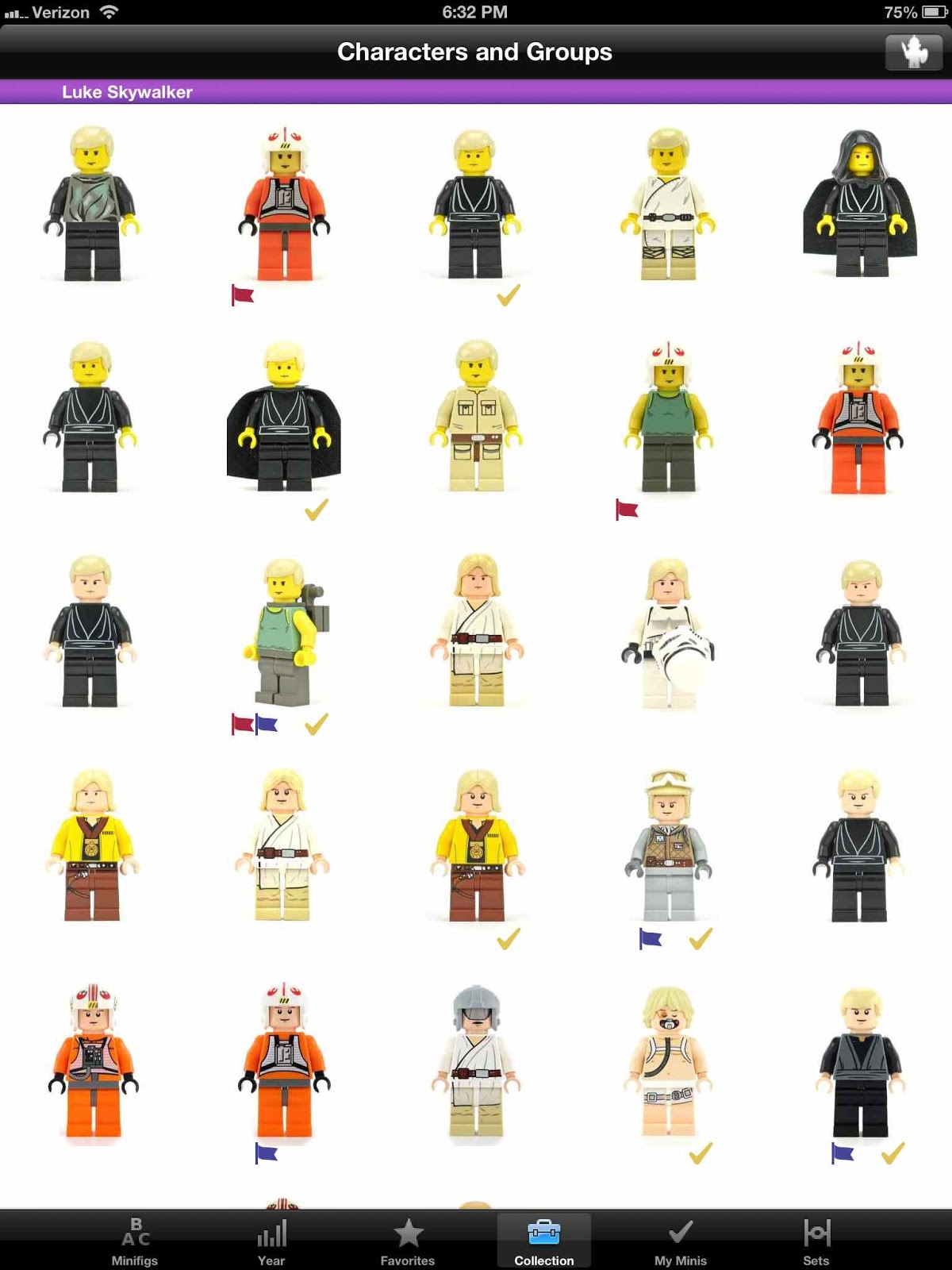
Here is the collection screen, which is a new screen showing all figures. You can toggle this screen and sort it four different ways: ratings, alphabetical, years, and groups. For iPod touch and iPhone this is now where the rating screen lives, but in grid form. Folks liked the rating screen but I thought the year and series were more important to keep as their own tab. I only had five tabs so the rating screen is moved to a toggle. The new toggle here is the group/character toggle screen. All figures are now able to be shown in a grouping. A few major characters, rather than in a group, have their own grouping just for them since there are so many of them. Luke, Obi Wan, Darth Vadar, Anakin, Han Solo, Boba Fett, and a few others have a section to themselves for each of them. Bascially if there were eight or more variants a figure gets its own section. Chewbacca got his own section even though he has only four variants, since he is so important. That is why Luke doesn't appear in the Jedi section for instance. The groups are not really based on logic, for some are called Naboo or Ewoks. I think it works better then it makes sense, and working well is more important than logic sometimes. Here is the Republic group and the Luke group. On iPad this new grid layout really shines! You can scroll through the 520+ thumbnails. Note the Aerial Trooper's jetpack is now pointing the right way. Note one figs has both flags, maybe someone is missing a weapon, and has also ordered the figure,


Lightsaber hilt colors are also now corrected. I went back and looked at all the sets a figure came in and looked at most recent set inventory for a fig to determine whether the hilt was chrome, metallic, or gray. All lighsaber variants were rephotographed for consistent appearance and mapped to the correct figures. Interestingly a few later sets still used the chrome hilts after they were discontinued. I can't remember off hand but I think they were signature sets such as the Imperial Shuttle that had the printed Stormtrooper pants and the Death Star. Also Palpatine from the Death Star appears in multiple sets. His weapon in the Death Star from the instructions is blue lightning bolts, but in the other set he has a red lightsaber. I gave him the lightsaber in the app since I figured that was the better weapon.
Clone Trooper naming is all over the map both from the set names and what is on Bricklink. I decided that it was important for you to see all the Clone troopers listed after one another alphabetically, so now the all start with the word Clone. See the app, I think it works better this way and no information is lost in translation. Rank, Legion, and name (if mentioned) are all there.
Finally, the code was rewritten and moved to iOS6 coding conventions and best practices. Also the minimum OS is now also iOS6 because the grid layout, a key feature, only works in iOS6. From tracking websites now 85% of devices have upgraded to iOS6, so apparently the only ones that haven't are the ones that can't. Unfortunately this burns a few of you, particularly those with iPad v1 or iPod v1 or v2. The grid view stresses even the most recent iPad a bit, so I can see why Apple chose not to support it with older devices. It is such a killer feature, and fulfilled so well the largest user request (all figures in my collection on one screen) that I had to move to iOS6.
You can now view your entire collection on one screen. This was the most requested feature. These figures are all checked because you own all of them, hence the 'My Collection' screen. Notice a few have a red or blue flag. More about that in a sec.

The own/don't own button is now simplified as just a checkbox, that changes the color to gold or light blue. There are now two flags you can toggle on and off. Rather than have different icons like a heart, piggybank, losticon, etc. I just chose to use generic flags so you can assign whatever you meaning you like. Here are some things you might use the flags for:
- I want it
- I need it
- Figures my brother borrowed
- Ones that I know I have but can't find
- Missing a part or have the wrong head
- Missing a weapon or cape
- I ordered it and it is in shipment, that is why its not here
- Saving up for it
- Getting it as a gift or birthday present
- And whatever else you want to use the flags for....

You get two flags, a red and a blue one and these are always shown by a figure. In addition, you can filter by the flags on the own screen and show the flagged figures instead of the ones you one. Click the Check icon in the upper right to toggle to the red flagged figures, then the blue flagged figures. If folks need another flag I have room to add two more in the future if this system works, so please tell me your use case and justify why you want more (green or black).
Here is the collection screen, which is a new screen showing all figures. You can toggle this screen and sort it four different ways: ratings, alphabetical, years, and groups. For iPod touch and iPhone this is now where the rating screen lives, but in grid form. Folks liked the rating screen but I thought the year and series were more important to keep as their own tab. I only had five tabs so the rating screen is moved to a toggle. The new toggle here is the group/character toggle screen. All figures are now able to be shown in a grouping. A few major characters, rather than in a group, have their own grouping just for them since there are so many of them. Luke, Obi Wan, Darth Vadar, Anakin, Han Solo, Boba Fett, and a few others have a section to themselves for each of them. Bascially if there were eight or more variants a figure gets its own section. Chewbacca got his own section even though he has only four variants, since he is so important. That is why Luke doesn't appear in the Jedi section for instance. The groups are not really based on logic, for some are called Naboo or Ewoks. I think it works better then it makes sense, and working well is more important than logic sometimes. Here is the Republic group and the Luke group. On iPad this new grid layout really shines! You can scroll through the 520+ thumbnails. Note the Aerial Trooper's jetpack is now pointing the right way. Note one figs has both flags, maybe someone is missing a weapon, and has also ordered the figure,

Lightsaber hilt colors are also now corrected. I went back and looked at all the sets a figure came in and looked at most recent set inventory for a fig to determine whether the hilt was chrome, metallic, or gray. All lighsaber variants were rephotographed for consistent appearance and mapped to the correct figures. Interestingly a few later sets still used the chrome hilts after they were discontinued. I can't remember off hand but I think they were signature sets such as the Imperial Shuttle that had the printed Stormtrooper pants and the Death Star. Also Palpatine from the Death Star appears in multiple sets. His weapon in the Death Star from the instructions is blue lightning bolts, but in the other set he has a red lightsaber. I gave him the lightsaber in the app since I figured that was the better weapon.
Clone Trooper naming is all over the map both from the set names and what is on Bricklink. I decided that it was important for you to see all the Clone troopers listed after one another alphabetically, so now the all start with the word Clone. See the app, I think it works better this way and no information is lost in translation. Rank, Legion, and name (if mentioned) are all there.
Finally, the code was rewritten and moved to iOS6 coding conventions and best practices. Also the minimum OS is now also iOS6 because the grid layout, a key feature, only works in iOS6. From tracking websites now 85% of devices have upgraded to iOS6, so apparently the only ones that haven't are the ones that can't. Unfortunately this burns a few of you, particularly those with iPad v1 or iPod v1 or v2. The grid view stresses even the most recent iPad a bit, so I can see why Apple chose not to support it with older devices. It is such a killer feature, and fulfilled so well the largest user request (all figures in my collection on one screen) that I had to move to iOS6.
Sunday, January 27, 2013
MyMinis Big Update - Series 9 and More
MyMinis was just updated with Series 9 figures and the matching 'Picture Touch Guide' to help you feel what is in the bag by touch, the best way to find them all! Series 9 is amazing, with a cool Heroic Knight figure, a Cyclops, and a very well done Policeman, and more. The Touch Guide shows you which parts to feel for and which to avoid, giving you a blind but touch based mental map to speed up your search to complete your collection (and avoid wasting gas on extra trips to the store when you get the wrong figure).


Next, for iPad, the large figure detail screen pictures were all upgraded to retina, which looks amazing but doubles the size of the app to about 40MB. Its worth it though as on an retina iPad you are now seeing over four times the number of pixels. This shows the amazing quality and detail that Lego put into these collectables. You will not see this image quality and size anywhere else. (Of course iPod touch /iPhone user have always had retina.) Also, the iPad tables now have larger images for the figures in Retina view as well. Here is a retina image - this thing is huge - this is one fourth the actual size!

Finally, I made the decision to move the codebase to iOS6. This was a difficult decision, for some users (iPad 1 and iPod Touch 2nd gen) cannot upgrade. I expect to get hit for that by reviews and understand your disappointment. However, iOS6 includes a key Apple code capability feature that many users have requested over and over and is tailer made for this app. I simply have to implement this new feature for those users and for the future of the app. This new feature allows you to see all the figures in an endless scrollable grid. This is cool because you can see more pictures on one screen, and the screen can go off the screen. I added two new grid screens, one for all the figures and the other just shows the ones that you own. You can now see your personal collection on a single screen for the first time! At the top it says how may figures you own as a total count.

The grid that shows all the figures is sortable by alphabetical order, series, favorite star ranking, and custom themes (music and dance, space and aliens for instance). Click the icon at the upper right to change the sort order. All the pictures of the figures have a small icon showing their series, and if owned also have a golden check. Also, there is a whole new set of larger images used for these grids so you can see these figures in more detail than with the tables. If you can, please upgrade to iOS6 and get this update.

Also, note one reviewer didn't know how to remove all starts from a rating. To remove all stars, slowly swipe left across the stars to remove them all.


Next, for iPad, the large figure detail screen pictures were all upgraded to retina, which looks amazing but doubles the size of the app to about 40MB. Its worth it though as on an retina iPad you are now seeing over four times the number of pixels. This shows the amazing quality and detail that Lego put into these collectables. You will not see this image quality and size anywhere else. (Of course iPod touch /iPhone user have always had retina.) Also, the iPad tables now have larger images for the figures in Retina view as well. Here is a retina image - this thing is huge - this is one fourth the actual size!

Finally, I made the decision to move the codebase to iOS6. This was a difficult decision, for some users (iPad 1 and iPod Touch 2nd gen) cannot upgrade. I expect to get hit for that by reviews and understand your disappointment. However, iOS6 includes a key Apple code capability feature that many users have requested over and over and is tailer made for this app. I simply have to implement this new feature for those users and for the future of the app. This new feature allows you to see all the figures in an endless scrollable grid. This is cool because you can see more pictures on one screen, and the screen can go off the screen. I added two new grid screens, one for all the figures and the other just shows the ones that you own. You can now see your personal collection on a single screen for the first time! At the top it says how may figures you own as a total count.

The grid that shows all the figures is sortable by alphabetical order, series, favorite star ranking, and custom themes (music and dance, space and aliens for instance). Click the icon at the upper right to change the sort order. All the pictures of the figures have a small icon showing their series, and if owned also have a golden check. Also, there is a whole new set of larger images used for these grids so you can see these figures in more detail than with the tables. If you can, please upgrade to iOS6 and get this update.

Also, note one reviewer didn't know how to remove all starts from a rating. To remove all stars, slowly swipe left across the stars to remove them all.
Thursday, December 27, 2012
BrickSpace and BrickCraft (Other apps by us!)
BrickSpace is an app for building Micro Lego Spaceships. These are truly incredible designs by 4estFeller, one of the best micro space designers you can see on Flickr. The BrickSpace app is the only place you will find instructions on how to build these spaceships and space scenes. It also has a fun quiz. Learn more here.

BrickCraft is a new app we made that is in the iTunes store. Check it out if you are at all interested in Minecraft and Lego bricks. Click here.
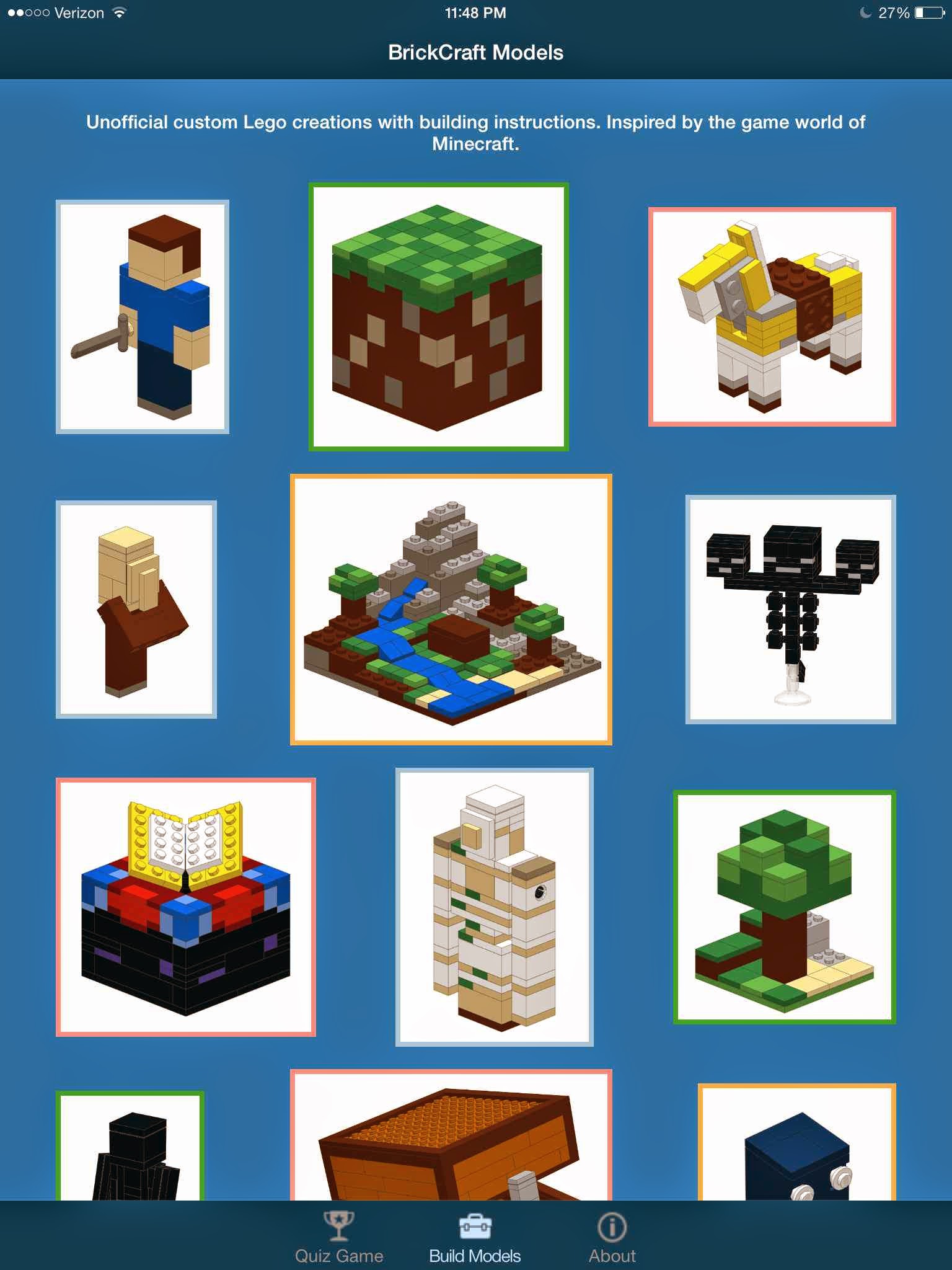
BrickCraft is a new app we made that is in the iTunes store. Check it out if you are at all interested in Minecraft and Lego bricks. Click here.
Sunday, September 2, 2012
Series 8 Update for MyMinis
Yesterday the MyMinis update for series 8 was submitted, so it should be live/approved in a little over a week, as currently the app store approval wait time seems to be about 10 days. I was luckily able to find the figs at a Toys R Us store here in a few days ago, but they then appeared in the Lego store yesterday for the time, so September 1 seems to be the official US release date. They come in a black bag this time and most of them were easy to find but there were a few surprises. The Conquistador is my favorite! The Touch Guide in the app will help you find them easily. I also fixed the picture for the Bride in Series 7 as her dress was on backwards, and added some additional pictures to the Series 7 Touch Guide.
Friday, August 10, 2012
SWMinis Update History
This is the version update history for SWMinis.
1.1.5 Update (Pending approval) (3/15/2015):
LARGEST CONTENT UPDATE EVER
Figures added:
86 new minifigures were added. They are from the summer wave of 2014, a few missing other figs like Darth Raven, The Luke from the book, and the Sandcrawler, and few others from previous years. Also added the figs from the January 2015 wave of sets of course . In all this update is the largest content update ever and contains figures from 32 sets. Also included the three holograms versions of Palpatine and the new Dewback from the Cantina set.
1.1.4 Update (4/10/2014):
Figures added:
Added 32 new 2014 minifigs! Also added the three figures from the Holocron Chamber.
New Features:
Displaying our unique figure code for reference in the lower left corner.
Figures added:
Most ever in one update! 58 new figures including the Entire Summer wave, the Ewok Village, the 2013 Advent Calender, Planets Series 3 & 4, and a few promotional figures such as NY Yoda.
New Features:
New iOS7 lighter design, improved detailed figure descriptions and naming, external site links based on figure name search to BrickOwl and BrickSet
New iOS Requirement:
Updated to use iOS7 only due to the layout, font and code changes
Bugs Fixed:
iOS7 fixes, several incorrect photos, some photos were too large and didn't swap correctly
Figures added:
27 new Minifigs from the January wave. Added 13 Creatures!
New Features:
Added the 'My Minis' tab screen to see your collection on one screen. This was the #1 requested feature! Also added a second collection screen - a large sortable grid of larger thumbnails. Added a new sort order by major figure or group. All figures can be seen by grouping (Jedi, Bounty Hunter, Luke, Ewok, etc.) Added red and blue flags - use them how you like to mark figures you want, need, lost, have missing parts, etc. Filter by red of blue flag on the My Minis screen.
iOS New Requirement:
The app requires iOS6 now because the grid layout is iOS6 only. Major code improvements.
Photo Corrections: Aerial Clone Trooper, Darth Malgus.
Lightsabers:
Hilts are now correct between chrome, gray, and the newer metallic. Lightsabers are also correct between 'green' (appears yellow) and bright green.
Improvements:
Larger iPad tablelist thumbnails. Set titles with no figures are marked as gray in the set list. Lists are now sorted alphabetically within the ratings and years table sections. Clone Trooper naming is improved.
16 new figures including the 8 new ones from the Advent Calendar.
minor code changes.
All 32 of the Summer wave, and 12 more (Microfigs and 2 promos).
New Features:
Total overall and by year, mark a set as complete, link to Bricklink website info.
January Wave of 26 new minifig styles, and two others.
Eight including Santa Yoda, Young Han Solo, Dengar from the Super Star Destroyer, and some others released since the summer wave.
minor code changes.
All 34 new Summer 2011 Minifigs!
New Feature:
Find minifig styles in a particular set by set name, number, or year.
TX-20, R8-B7, Shadow ARF Trooper
Bugs Fixed:
If no 5 star ratings existed and user scrolled to top app crashed
Other:
Added Legal notice to this page rather than a link
1.1.5 Update (Pending approval) (3/15/2015):
LARGEST CONTENT UPDATE EVER
Figures added:
86 new minifigures were added. They are from the summer wave of 2014, a few missing other figs like Darth Raven, The Luke from the book, and the Sandcrawler, and few others from previous years. Also added the figs from the January 2015 wave of sets of course . In all this update is the largest content update ever and contains figures from 32 sets. Also included the three holograms versions of Palpatine and the new Dewback from the Cantina set.
1.1.4 Update (4/10/2014):
Figures added:
Added 32 new 2014 minifigs! Also added the three figures from the Holocron Chamber.
New Features:
Displaying our unique figure code for reference in the lower left corner.
1.1.3 Update (10/15/2013):
BIG UPDATEFigures added:
Most ever in one update! 58 new figures including the Entire Summer wave, the Ewok Village, the 2013 Advent Calender, Planets Series 3 & 4, and a few promotional figures such as NY Yoda.
New Features:
New iOS7 lighter design, improved detailed figure descriptions and naming, external site links based on figure name search to BrickOwl and BrickSet
New iOS Requirement:
Updated to use iOS7 only due to the layout, font and code changes
Bugs Fixed:
iOS7 fixes, several incorrect photos, some photos were too large and didn't swap correctly
1.1.2 Update (2/18/2013):
BIG UPDATEFigures added:
27 new Minifigs from the January wave. Added 13 Creatures!
New Features:
Added the 'My Minis' tab screen to see your collection on one screen. This was the #1 requested feature! Also added a second collection screen - a large sortable grid of larger thumbnails. Added a new sort order by major figure or group. All figures can be seen by grouping (Jedi, Bounty Hunter, Luke, Ewok, etc.) Added red and blue flags - use them how you like to mark figures you want, need, lost, have missing parts, etc. Filter by red of blue flag on the My Minis screen.
iOS New Requirement:
The app requires iOS6 now because the grid layout is iOS6 only. Major code improvements.
Photo Corrections: Aerial Clone Trooper, Darth Malgus.
Lightsabers:
Hilts are now correct between chrome, gray, and the newer metallic. Lightsabers are also correct between 'green' (appears yellow) and bright green.
Improvements:
Larger iPad tablelist thumbnails. Set titles with no figures are marked as gray in the set list. Lists are now sorted alphabetically within the ratings and years table sections. Clone Trooper naming is improved.
1.1.1 Update (9/25/2012):
Figures added:16 new figures including the 8 new ones from the Advent Calendar.
1.0.9 - 1.1.0 (8/10/2012):
Other:minor code changes.
1.0.8 Update (8/1/2012):
Figures added:All 32 of the Summer wave, and 12 more (Microfigs and 2 promos).
New Features:
Total overall and by year, mark a set as complete, link to Bricklink website info.
1.0.7 Update (2/5/2012):
Figures added:January Wave of 26 new minifig styles, and two others.
1.0.6 Update (12/20/2011):
SWMinis is now a Universal App! When used on an iPad, the app will automatically adjust to use the larger screen size. Goodbye 2x mode. This was a feature requested by you.1.0.5 Update (11/20/2011):
Figures added:Eight including Santa Yoda, Young Han Solo, Dengar from the Super Star Destroyer, and some others released since the summer wave.
1.0.4 Update (9/8/2011):
Other:minor code changes.
1.03 Updates (8/2/2011):
Figures added:All 34 new Summer 2011 Minifigs!
New Feature:
Find minifig styles in a particular set by set name, number, or year.
1.02 Updates (5/9/2011):
Figures added:TX-20, R8-B7, Shadow ARF Trooper
Bugs Fixed:
If no 5 star ratings existed and user scrolled to top app crashed
Other:
Added Legal notice to this page rather than a link
1.01 Updates (4/25/2011):
Nothing in app. Just fixed iTunes photo listing bug1.00 (3/19/2011):
First Version.Monday, December 19, 2011
SWMinis is now a Universal App
With a couple simple modifications, SWMinis has just been updated to be a universal app. It was much easier to do after figuring out the process after doing it to MyMinis. It took about four hours to alter the app code to make it universal, and Apple approved the update in less than 20 hours. Thats a record for me, since it usually takes a week for updates to be approved. SWMinis now takes advantage of the larger screen size and rotates in all directions on the iPad. The app is unchanged on iPhone and iPod Touch and the functionality is identical for both iPhone/iPod Touch/iPad. Merry Christmas!


Tuesday, September 27, 2011
MyMinis is now a Universal App!
MyMinis is now a universal app that works on the iPad in full resolution, and works just like it did before on the iPhone/iPod Touch. Don't worry if you dont have an iPad. The functionality is the same on both, and when you get MyMinis you get both the iPhone and iPad version in the same download (thats what a universal app is). If you later get an iPad it will work fine and is free to install. I decided to keep it simple and just focus on making MyMinis work in all four rotations and keep the same design for the iPad version. However, since the minifig photos fill the entire screen on the iPad, they are as large as possible and you can make out a lot more detail since the figures are so large on the iPad. I think the iPad version is great for a brand new audience as well - very young children (age 1-2). They like to just look at the colorful images and have a parent change the photo from one figure to the next.
Saturday, September 17, 2011
SWMinis updated with Summer 2011 Figs!
I bought all the summer sets and took out the figs, photographed them and added a new update. This update I think is really special because not only have I added 34 new figs, but also added a new database to the app that holds all the Star Wars sets. The new pics are all of a higher quality than the previous ones, and I also redesigned my lighting setup and got a better camera, a Canon s95.


Subscribe to:
Posts (Atom)